Index Build Tools
After many months of hard work, we kind of, sort of have a document ingestion pipeline that seems to work. By this I mean we have a minimal set of configuration and ingestion tools that we can compile and then run without crashing, and these tools seem to ingest files mostly as expected. We’re still going to need to do a lot of testing, tuning and evaluation, but I thought it would be helpful to take this time to walk through the process of bringing up an index from a set of chunk files extracted from Wikipedia.
The remainder of this post is a fairly long step-by-step description of the process I used to configure and start a BitFunnel index. It’s pretty dry, but should be useful for people who want to play around with the system.
Obtaining a Sample Corpus
I decided to use a small portion of the English Wikipedia as a basis for this walkthrough. This piece contains about 17k articles. I processed it into a collection of BitFunnel chunk files which you can download from our Azure blob storarge. (see the post entitled Sample Data for instructions on downloading the pre-built chunk files).
The chunk files were built from a Wikipedia dump using the process outlined in the WorkBench README. If you would like to build your own chunks from scratch, download the dump from the Wikipedia dump page or grab an archived copy from our Azure blob storage. Either way, the file must be decompressed before it can be used.
The Wikipedia dump file is converted to chunks using a two-step process. The first step uses an open source project called wikiextractor to filter out Wikipedia markup.
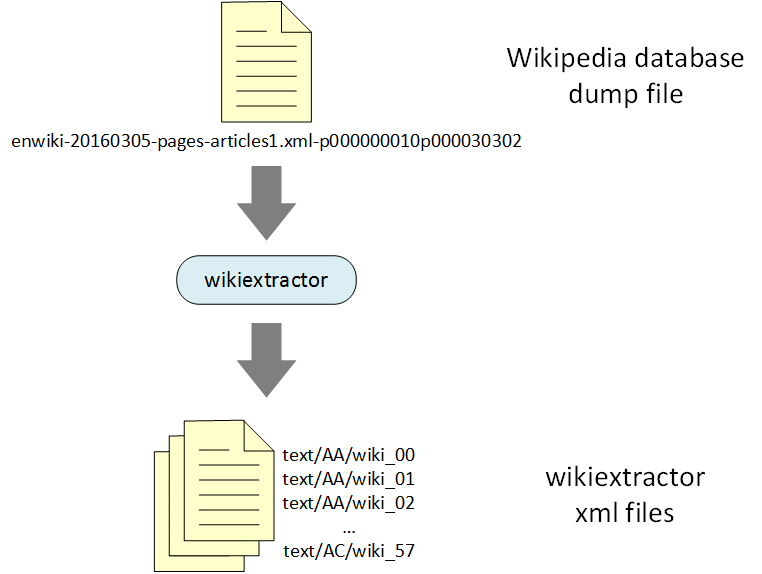
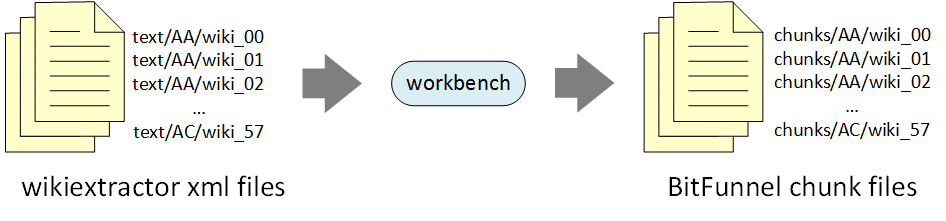
The output of Wikiextractor is a set of 1Mb XML files, with names like wiki_00, wiki_01, wiki_02, etc. and organized under directories AA, AB, AC, etc.
The second step uses the Java-based Workbench project to perform word-breaking, stemming, and stop-word elimination. The output of the Workbench stage is a set of BitFunnel chunk files.
Gathering Corpus Statistics
Because BitFunnel is a probabilistic algorithm based on Bloom Filters, its configuration depends on statistical properties of the corpus, like the distributions of term frequencies and document lengths.
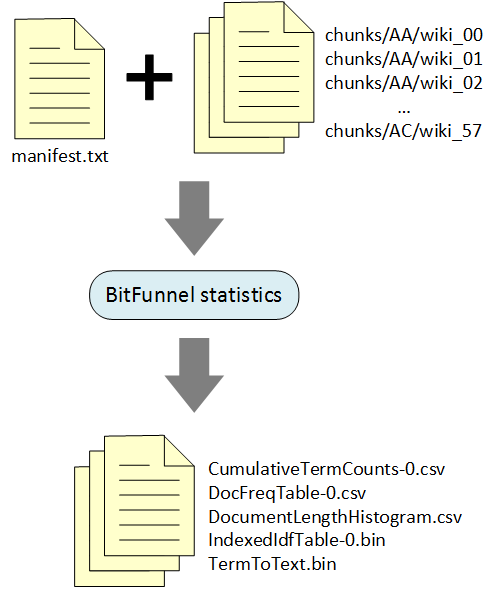
The BitFunnel statistics command generates these statistics from a representative corpus.
Run BitFunnel statistics -help to print out a help message
describing the command line arguments.
% BitFunnel statistics -help
StatisticsBuilder
Ingest documents and compute statistics about them.

Usage:
BitFunnel statistics <manifestFile>
                     <outDir>
                     [-help]
                     [-text]
                     [-gramsize <integer>]

<manifestFile>
    Path to a file containing the paths to the chunk
    files to be ingested. One chunk file per line.
    Paths are relative to working directory. (string)

<outDir>
    Path to the output directory where files will
    be written.  (string)

[-help]
    Display help for this program. (boolean, defaults to false)


[-text]
    Create mapping from Term::Hash to term text. (boolean, defaults to false)


[-gramsize <integer>]
    Set the maximum ngram size for phrases. (integer,
    defaults to 1)
The first parameter is a manifest file that lists the paths to the chunk
files, one file per line. You can generate a manifest file with all of the
chunks using the Linux find command. Here’s an example that uses the find command
to create a manifest for all of the prebuilt chunks that were
downloaded to /tmp/wikipedia/chunks.
% find /tmp/wikipedia/chunks -type f > /tmp/wikipedia/manifest.txt
The second parameter to BitFunnel statistics
is the output directory. In this case I used /tmp/wikipedia/config
(note that the prebuilt chunk tarball includes a wikipedia/config directory
with the output of this walkthrough). Be sure to create the output directory
if it doesn’t already exist:
% mkdir /tmp/wikipedia/config
When I ran BitFunnel statistics, I omitted the -gramsize parameter
because I wanted statistics for a corpus of unigrams.
Had I included -gramsize, I could have generated statistics for
a corpus that included bigrams or trigrams or larger
ngrams.
I included the -text parameter because I wanted the document frequency table to be annotated with the text of each term. Had I not included -text, the terms would be represented solely by their hash values.
Here’s the console log:
% BitFunnel statistics /tmp/wikipedia/manifest.txt  /tmp/wikipedia/config
Blocksize: 3592
Loading chunk list file '/tmp/wikipedia/manifest.txt'
Temp dir: '/tmp/wikipedia/config'
Reading 259 files
Ingesting . . .
ChunkManifestIngestor::IngestChunk: filePath = /tmp/wikipedia/chunks/.DS_Store
ChunkManifestIngestor::IngestChunk: filePath = /tmp/wikipedia/chunks/AA/wiki_00
ChunkManifestIngestor::IngestChunk: filePath = /tmp/wikipedia/chunks/AA/wiki_01
ChunkManifestIngestor::IngestChunk: filePath = /tmp/wikipedia/chunks/AA/wiki_02
...
ChunkManifestIngestor::IngestChunk: filePath = /tmp/wikipedia/chunks/AC/wiki_56
ChunkManifestIngestor::IngestChunk: filePath = /tmp/wikipedia/chunks/AC/wiki_57
Ingestion complete.
  Ingestion time = 11.5985
  Ingestion rate (bytes/s): 1.78954e+07
Shard count:1
Document count: 17618
Bytes/Document: 11781.1
Total bytes read: 207559890
Posting count: 12848420
The statistics files were written to c/tmp/wikipedia/config:
ls -l /tmp/wikipedia/config
total 100384
-rw-r--r--  1 mhop  wheel    216796 Sep 18 16:07 CumulativeTermCounts-0.csv
-rw-r--r--  1 mhop  wheel  21516222 Sep 18 16:07 DocFreqTable-0.csv
-rw-r--r--  1 mhop  wheel     18265 Sep 18 16:07 DocumentLengthHistogram.csv
-rw-r--r--  1 mhop  wheel   8202248 Sep 18 16:07 IndexedIdfTable-0.bin
-rw-r--r--  1 mhop  wheel  13463535 Sep 18 16:07 TermToText.bin
CumulativeTermCounts-0.csv tracks the number of unique terms encountered
as a function of the number of documents ingested. It is not currently used
but will be needed for accurate models of memory consumption.
DocumentLengthHistogram.csv is a histogram of documents organized by
the number of unique terms in each document.
It is not currently used, but will be needed to determine
how to organize documents into shards according to posting count.
DocFreqTable-0.csv lists the unique terms in the corpus in descending
frequency order. In other words, more common words appear before less common
words. Here’s what the file looks like:
% more /tmp/wikipedia/config/DocFreqTable-0.csv
hash,gramSize,streamId,frequency,text
3f0ffc72a21fd2be,1,1,0.840447,from
b3697479c07d98d5,1,1,0.808378,which
4d34895e97b1888c,1,1,0.795266,also
17e90965afd3104d,1,1,0.763764,have
d14e34f5833aecee,1,1,0.755875,one
5d4e8d01c132cf18,1,1,0.745147,other
...
8f2e873ae4281b44,1,1,5.67601e-05,arslān
d859a38c4ac69616,1,1,5.67601e-05,influxu
c307a841264a8d2d,1,1,5.67601e-05,köşk
e19c09157d44124,1,1,5.67601e-05,tharil
3885b5929dd1a8dd,1,1,5.67601e-05,www.routledge.com
As you can see, the term “from” is the most common, appearing in about 84% of documents. Towards the end of the file, “arslān” is one of the rarest, appearing in 0.006% of documents, or once in the entire corpus of 17618 documents.
IndexedIdfTable-0.bin is a binary file containing the IDF value for each term.
It is used for constructing Terms during document ingestion and query
formulation.
Finally, TermToText.bin is binary file containing a mapping from a term’s
hash value to its text representation. It is used for debugging and diagnostics.
These files will be used in the next stage where we build the TermTable.
Building a TermTable
The TermTable is one of the most important data structures in BitFunnel.
It maps each term to the exact set of rows used to indicate the term’s
presence in a document.
I won’t get into how the TermTable builder works at this point, but let’s look
at how to run it. Type BitFunnel termtable -help:
BitFunnel termtable -help
TermTableBuilderTool
Generate a TermTable from a DocumentFrequencyTable.

Usage:
BitFunnel termtable <tempPath>
                    [-help]

<tempPath>
    Path to a tmp directory. Something like /tmp/ or c:\temp\,
    depending on platform.. (string)

[-help]
    Display help for this program. (boolean, defaults to false)
In this case the help message could be a bit better.
All you need to know is that BitFunnel termtable has a single argument
and this is the output directory from the BitFunnel statistics stage.
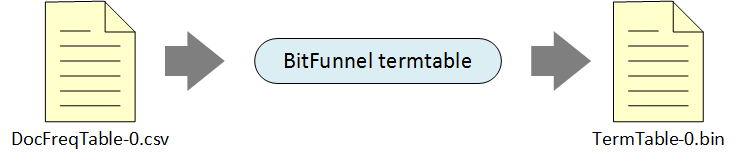
The TermTable builder will read DocFreqTable-0.csv, constuct a very basic
TermTable, and write it to TermTable-0.bin.
For now, the algorithm creates a TermTable for unigrams
that uses a combination of rank 0 and rank 3 rows. The algorithm
is naive and doesn’t handle higher order ngrams.
Down the road, we will improve the algorithm and add more options.
Here’s the output from my run:
BitFunnel termtable /tmp/wikipedia/config
Loading files for TermTable build.
Starting TermTable build.
Total build time: 0.439845 seconds.
===================================
RowAssigner for rank 0
  Terms
    Total: 512640
    Adhoc: 468884
    Explicit: 42357
    Private: 1399

  Rows
    Total: 5814
    Adhoc: 590
    Explicit: 3822
    Private: 1399

  Bytes per document: 778.75


  Densities in explicit shared rows
    Mean: 0.0999029
    Min: 0.0980813
    Max: 0.0999549
    Variance: 3.00201e-08

===================================
RowAssigner for rank 1
  No terms

===================================
RowAssigner for rank 2
  No terms

===================================
RowAssigner for rank 3
  Terms
    Total: 511026
    Adhoc: 416436
    Explicit: 90958
    Private: 3632

  Rows
    Total: 36107
    Adhoc: 1827
    Explicit: 30648
    Private: 3632

  Bytes per document: 564.172


  Densities in explicit shared rows
    Mean: 0.099836
    Min: 0.0124819
    Max: 0.0999997
    Variance: 5.68987e-07

===================================
RowAssigner for rank 4
  No terms

===================================
RowAssigner for rank 5
  No terms

===================================
RowAssigner for rank 6
  No terms

===================================
RowAssigner for rank 7
  No terms

Writing TermTable files.
Done.
From the output, above, we can see that this index will consume roughly 779 bytes of rank 0 rows and 562 bytes of rank 3 rows per document ingested. This corpus has 17618 documents, so the total memory consumption for rows should be about 22.8Mb. This is a significant reduction over the 198Mb of chunk files, but we at this point, we can draw no conclusions because we have no idea whether this naive configuration has an acceptable false positive rate.
If we look in tmp/wikipedia/config we will see the TermTable is stored in
a new binary file called TermTable-0.bin:
ls -l /tmp/wikipedia/config
total 100384
-rw-r--r--  1 mhop  wheel    216796 Sep 18 16:07 CumulativeTermCounts-0.csv
-rw-r--r--  1 mhop  wheel  21516222 Sep 18 16:07 DocFreqTable-0.csv
-rw-r--r--  1 mhop  wheel     18265 Sep 18 16:07 DocumentLengthHistogram.csv
-rw-r--r--  1 mhop  wheel   8202248 Sep 18 16:07 IndexedIdfTable-0.bin
-rw-r--r--  1 mhop  wheel   7970980 Sep 18 16:09 TermTable-0.bin
-rw-r--r--  1 mhop  wheel  13463535 Sep 18 16:07 TermToText.bin
We’ve now configured our system for a typical corpus with documents similar to those in the chunk files listed in the original manifest. In the next step we will ingest some files and look at the resulting row table values.
Ingesting a Small Corpus
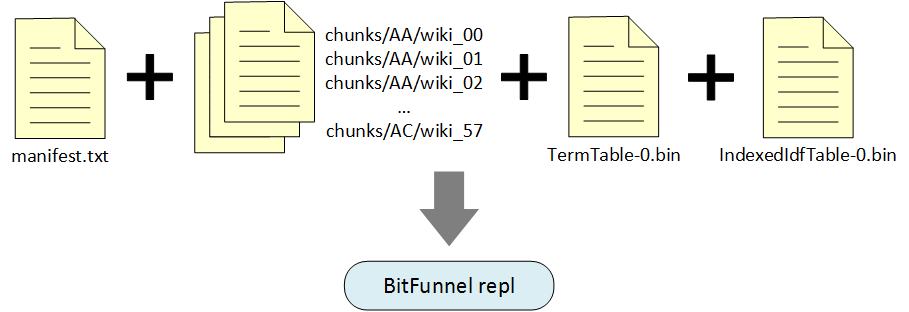
Now we’re getting to the fun part. BitFunnel repl is a sample application that
provides an interactive Read-Eval-Print loop for ingesting documents, running
queries, and inspecting various data structures.
Here’s the help message:
BitFunnel repl -help
StatisticsBuilder
Ingest documents and compute statistics about them.

Usage:
BitFunnel repl <path>
               [-help]
               [-gramsize <integer>]
               [-threads <integer>]

<path>
    Path to a tmp directory. Something like /tmp/ or c:\temp\,
    depending on platform.. (string)

[-help]
    Display help for this program. (boolean, defaults to false)


[-gramsize <integer>]
    Set the maximum ngram size for phrases. (integer, defaults
    to 1)

[-threads <integer>]
    Set the thread count for ingestion and query processing.
    (integer, defaults to 1)
The first parameter is the path to the directory with the configuration
files. In my case this is /tmp/wikipedia/config. The gramsize should be the same
value used in the BitFunnel statistics stage.
When you start the application, it prints out a welcome message, explains how to get help, and then prompts for input. The prompt is an integer followed by a colon. Type “help” to get a list of commands. You can also get help on a specific command:
BitFunnel repl /tmp/wikipedia/config
Welcome to BitFunnel!
Starting 1 thread
(plus one extra thread for the Recycler.

directory = "/tmp/wikipedia/config"
gram size = 1

Starting index ...
Blocksize: 11005320
Index started successfully.

Type "help" to get started.

0: help
Available commands:
  cache   Ingests documents into the index and also stores them in a cache
for query verification purposes.
  delay   Prints a message after certain number of seconds
  help    Displays a list of available commands.
  load    Ingests documents into the index
  query   Process a single query or list of queries. (TODO)
  quit    waits for all current tasks to complete then exits.
  script  Runs commands from a file.(TODO)
  show    Shows information about various data structures. (TODO)
  status  Prints system status.
  verify  Verifies the results of a single query against the document cache.

Type "help <command>" for more information on a particular command.

1: help cache
cache (manifest | chunk) <path>
  Ingests a single chunk file or a list of chunk
  files specified by a manifest.
  Also caches IDocuments for query verification.

2: help show
show cache <term>
   | rows <term> [<docstart> <docend>]
   | term <term>
  Shows information about various data structures.  PARTIALLY IMPLEMENTED
Right now the cache command doesn’t support the manifest option and the show command only supports the rows and terms option.
Let’s ingest a single chunk file. We’ll use /tmp/wikipedia/chunks/AA/wiki_00
which contains the following 41 documents:
- 12: Anarchism
- 25: Autism
- 39: Albedo
- 128: Talk:Atlas Shrugged
- 290: A
- 295: User:AnonymousCoward
- 303: Alabama
- 305: Achilles
- 307: Abraham Lincoln
- 308: Aristotle
- 309: An American in Paris
- 316: Academy Award for Best Production Design
- 324: Academy Awards
- 330: Actrius
- 332: Animalia (book)
- 334: International Atomic Time
- 336: Altruism
- 339: Ayn Rand
- 340: Alain Connes
- 344: Allan Dwan
- 354: Talk:Algeria
- 358: Algeria
- 359: List of Atlas Shrugged characters
- 569: Anthropology
- 572: Agricultural science
- 573: Alchemy
- 579: Alien
- 580: Astronomer
- 582: Talk:Altruism/Archive 1
- 586: ASCII
- 590: Austin (disambiguation)
- 593: Animation
- 594: Apollo
- 595: Andre Agassi
- 597: Austroasiatic languages
- 599: Afroasiatic languages
- 600: Andorra
- 612: Arithmetic mean
- 615: American Football Conference
- 620: Animal Farm
- 621: Amphibian
Here’s the chunk loading in the REPL console:
3: cache chunk /tmp/wikipedia/chunks/AA/wiki_00
Ingesting chunk file "/tmp/wikipedia/chunks/AA/wiki_00"
Caching IDocuments for query verification.
ChunkManifestIngestor::IngestChunk: filePath = /tmp/wikipedia/chunks/AA/wiki_00
Ingestion complete.
We can now use the show rows command to display the rows
associated with a particular term.
This command lists each of the RowIds associated with a term,
followed by the bits for the first 64 documents.
The document ids are printed vertically
above each column of bits.
4: show rows also
Term("also")
                 d 00012233333333333333333555555555555566666
                 o 12329900000123333344555677788899999901122
                 c 25980535789640246904489923902603457902501
  RowId(0, 1005 ): 11111111111011111111111101011111111111011
5: show rows some
Term("some")
                 d 00012233333333333333333555555555555566666
                 o 12329900000123333344555677788899999901122
                 c 25980535789640246904489923902603457902501
  RowId(0, 1011 ): 11111011111011001101110101001101111111011
6: show rows wings
Term("wings")
                 d 00012233333333333333333555555555555566666
                 o 12329900000123333344555677788899999901122
                 c 25980535789640246904489923902603457902501
  RowId(3, 6668 ): 00000001000000000000000000000000000000000
  RowId(3, 6669 ): 00000001000000000000000000000000000000000
  RowId(3, 6670 ): 00000001000000000000000000000000000000000
  RowId(0, 4498 ): 00000001000000000000110000000100000000000
7: show rows anarchy
Term("anarchy")
                 d 00012233333333333333333555555555555566666
                 o 12329900000123333344555677788899999901122
                 c 25980535789640246904489923902603457902501
  RowId(3, 11507): 10000000110000001000010000000000000000000
  RowId(3, 11508): 10000000110000001000010000000000000000000
  RowId(3, 11509): 10000000110000001000010000000000000000000
  RowId(0, 5354 ): 11000001110000000000010001001000000000010
8: show rows kingdom
Term("kingdom")
                 d 00012233333333333333333555555555555566666
                 o 12329900000123333344555677788899999901122
                 c 25980535789640246904489923902603457902501
  RowId(0, 1609 ): 11000010010000100000000000000001000010001
At prompt 4, the command show rows also returns a single RowId(0, 1005)
corresponding to the term “also”. This is a rank 0 row in position 1005.
The fact that the word “also” is associated with a single row indicates
that the term is fairly common in the corpus.
This is consistent with the pattern of 1 bits which show that the term
appears in every document except 316, 572, 579, and 615.
At prompt 5, we see that the word “some” is also common in the corpus. It appears in every document except 295, 316, 332, 334, 359, 572, 579, 580, and 615.
Both “also” and “some” appear so frequently that are assigned private rows.
The term “wings”, seen at prompt 6, is less common. It is actually rare enough to require four row intersections to drive the noise to a tolerable level. If we look at the intersection of the four rows, we see that only document 305 contains the term. This is the only column that consists solely of 1s. All of the other columns have some 0s.
At prompt 7 we see that anarchy is also rare enough to require four rows, but it seems to appear in documents 12, 307, 308, and 358. A quick search of the actual web pages shows that “anarchy” appears in document 12 which is about Anarchism and document 307 which is about Abraham Lincoln. Pages 308 and 358 do not actually contain the term, so we are seeing a case where BitFunnel would report false positives.
Now let’s look at the verify one command. Today this command
runs a very slow verification query engine on the IDocuments cached earlier by the cache chunk
command. In the future, verify will run the BitFunnel query engine and compare
its output with the verification query engine.
9: verify one wings
Processing query " wings"
  DocId(305)
1 match(es) out of 41 documents.
10: verify one anarchy
Processing query " anarchy"
  DocId(307)
  DocId(12)
Prompt 9 shows that only document 305 contains the term “wings”. Prompt 10 reports that only documents 12 and 307 contain the term anarchy.
Note that verify one accepts any legal BitFunnel query.
Here’s an example:
11: verify one -some (anarchy | kingdom)
Processing query " -some (anarchy | kingdom)"
  DocId(332)
1 match(es) out of 41 documents.
Well that’s enough for now. Hopefully this walkthrough will help you get started with BitFunnel configuration.